Managing next actions and projects in Apple reminders

We are moving into 2026 now and I wonder…

Do you guys still using Apple Reminders today or do Todoist and Omnifocus won you back from this ”flirt” ??
I’ll let them respond, but they released a podcast episode in late 2025, Tools Check-In. They discuss reminders and many other topics of interest.

 
My biggest issue with reminders and almost all task managers is how poorly they think thru UI. It's simply too easy to enter into an edit mode on a touch device. If every app just followed the genius of Drafts and provided a read / interact mode, with a single toggle, so many more apps would be more viable for me.
I’ve considered using Reminders for many years, and it’s never stuck. It’s also a UI issue for me. Not editing, but display. There’s no way to hide information in the notes field when viewing the list, so scanning presents a mixture of actionable titles and reference information. The font size and color are too similar for my aging eyes. If one were to pry my paper system from me, I’d move back to Things.
 
To the surprise of no one, I've migrated back to Things 3. The Apple Reminders experiment was a great learning opportunity - I discovered that I truly am repelled by visual noise and clutter, and I really value the separation of Work & Personal but wish to maintain all inside a single tool.

Things is still the best solution for me given these learnings. I still use Apple Reminders for actual reminders (such as to pick up a package from my building's front desk when returning home), and non-actionable shopping lists and someday/maybes (trips to take, restaurants to try, movies to watch...), but Things is where I continue to do my project and next action tracking.

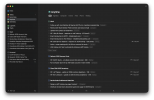
Below is my current setup, which hasn't changed all that much. It's pretty simple, clean and easy to maintain.
Screenshot 2026-01-19 at 4.38.36 PM.png
 
@MichaelB215 I love Things but still wonder why the heck they don't wan't to use iCloud synchronization. This is not reasonable since Things is a one-time purchase and they have to pay for their servers.
 
@MichaelB215 I love Things but still wonder why the heck they don't wan't to use iCloud synchronization. This is not reasonable since Things is a one-time purchase and they have to pay for their servers.
While iCloud sync does work reliably, it can be sluggish, depending on the app. Things sync is generally quite fast, and I suspect Cultured Code has decided iCloud is not up to their standards.
 
While iCloud sync does work reliably, it can be sluggish, depending on the app. Things sync is generally quite fast, and I suspect Cultured Code has decided iCloud is not up to their standards.
@mcogilvie After your recommendation I am a happy user of Bear (notes). It uses iCloud and synchronization works flawlessly and is super fast. I understand that Nozbe and Todoist use their own servers because they are multiplatform. But Things is Apple only…
 
To the surprise of no one, I've migrated back to Things 3. The Apple Reminders experiment was a great learning opportunity - I discovered that I truly am repelled by visual noise and clutter, and I really value the separation of Work & Personal but wish to maintain all inside a single tool.

Things is still the best solution for me given these learnings. I still use Apple Reminders for actual reminders (such as to pick up a package from my building's front desk when returning home), and non-actionable shopping lists and someday/maybes (trips to take, restaurants to try, movies to watch...), but Things is where I continue to do my project and next action tracking.

Below is my current setup, which hasn't changed all that much. It's pretty simple, clean and easy to maintain.
View attachment 2398
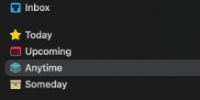
I'm confused are your contexts this 1769013218394.pngor this 1769013251902.png? And I've never understood Personal and Work. I thought GTD was to integrate one life into one system. In other words I have all projects on one list with the next action in context. Don't contexts of work and home adjust that so there are no conflicts? Do you keep two calendars?
 
I'm confused are your contexts this View attachment 2400or this View attachment 2401? And I've never understood Personal and Work. I thought GTD was to integrate one life into one system. In other words I have all projects on one list with the next action in context. Don't contexts of work and home adjust that so there are no conflicts? Do you keep two calendars?
Cultured Code assumes a hierarchy: areas, projects, and actions, with contexts implemented as tags if you use them. After trying lots of different ideas, that is what I do. I use the Today list as well, which is not vanilla HTD but ok with David Allen. I use both project view and context view. There’s a vanilla GTD implementation in the David Allen setup guide too.
 
Cultured Code assumes a hierarchy: areas, projects, and actions, with contexts implemented as tags if you use them. After trying lots of different ideas, that is what I do. I use the Today list as well, which is not vanilla HTD but ok with David Allen. I use both project view and context view. There’s a vanilla GTD implementation in the David Allen setup guide too.
So not to belabor the point, but if it's today wouldn't you be in todays context? You could have a today next action you can't do because you are not in the correct context. And if it is due today shouldn't it be on your calendar. I feel that is the entire point of GTD is not to have daily to dos but have actions in context where you can do them. "Today" seems like a sub optimal context. And if you don't do the action today then you have to move it and then today isn't the right context for it to be in.
 
Use todaySo not to belabor the point, but if it's today wouldn't you be in today’s context? You could have a today next action you can't do because you are not in the correct context. And if it is due today shouldn't it be on your calendar. I feel that is the entire point of GTD is not to have daily to dos but have actions in context where you can do them. "Today" seems like a sub optimal context. And if you don't do the action today then you have to move it and then today isn't the right context for it to be in.
Today is a daily list of possible tasks, not a context. It isncludes all next actions which are due today, all next actions which are scheduled to start today (like a tickler file), and any next actions you want to put on the Today list for any reason. All actions show what projects or area they belong to. They also can have context tags, and you can filter this list (or any list) by context or other tags. Changing anything is very fast and I think intuitive. The Today view also optionally shows your Apple calendar for today, including any Google calendar entries et cetera linked in.
 
Top