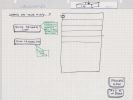
Wondering what GTDers have found what "Control Panel / Dashboard" is the best tool for decreasing numbness~overwhelm~repulsion ?
As in other words Outcome:
A "Control Panel / 'Dashboard'" that shows as much Listing as necessary while facilitating as much immediate access to as much detail as possible while keeping the overall Lists "Control Panel / 'Dashboard'" as attractive as possible ?
Thank you very much
As one sees how GTD fits best. . . .
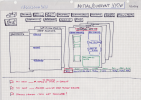
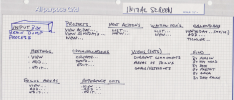
Great question — and what you’re describing is actually very close to what David Allen sketches in the “ideal GTD app” blueprint.
In the GTD methodology, the purpose of a system is not to impress you visually. It’s to give you Control and Perspective — nothing more, nothing less.
What most people call a “dashboard” is often an attempt to solve a deeper discomfort: numbness, overwhelm, or subtle repulsion toward looking at one’s lists.
Here’s the key distinction:

GTD does not require a dashboard
It requires:
- Clear lists (Projects, Next Actions by context, Waiting For, Someday/Maybe)
- A trusted Calendar
- A Weekly Review
- Clean separation of horizons
That’s it.
If your lists are:
- Complete
- Current
- Reviewed
…you already have your “control panel.”

The “ideal dashboard” in GTD terms
The GTD blueprint (as David has described it over the years) implies something very simple:
A view that shows:
- Calendar (hard landscape)
- Next Actions by context
- Projects list (for review, not for doing)
- Waiting For
With frictionless drill-down into project support and reference.
Notice what’s not required:
- KPIs
- Visual heatmaps
- Progress bars
- Gamification
- Fancy widgets
Those can be useful — but they are not structural to GTD.

Why the “perfect dashboard” is hard
The real challenge isn’t design. It’s object architecture.
Your ecosystem might include:
- Tasks
- Projects
- Areas of Focus
- Goals
- Tags
- Contexts
- Energy filters
- Delegations
- Teams
- Notes
- Attachments
Depending on how those objects are modeled in your tool (Todoist? Things? Omnifocus? Notion? Teams? Custom stack…?), the dashboard possibilities change dramatically.
The “ideal page” is therefore not universal — it depends on your system architecture.
That’s why many GTDers chase dashboards but feel disappointed.
They’re solving a psychological discomfort with a visual layer — instead of cleaning the structural layer.

If overwhelm is the real issue…
I would ask:
- Are your Projects clearly defined as outcomes?
- Do all projects have at least one Next Action?
- Is your Waiting For list current?
- Are you doing a true Weekly Review?
- Are you overloading your Active Projects?
Often the repulsion is not about the interface — it’s about unclear commitments.

My recommendation
Before redesigning a dashboard:
- Re-clarify your Projects.
- Reduce active commitments.
- Clean Next Actions.
- Do a full Weekly Review.
Then evaluate whether you still need a new control panel.
If you want to explore architecture options based on your specific ecosystem, feel free to DM me privately.
Technically speaking, almost anything is possible — but the leverage point is clarity, not cosmetics.